Understanding MOOS-IvP files
I expanded the community’s existing VS Code extension with language support that recognizes MOOS-IvP apps, behaviors that guide vehicle decisions, and their parameters in context. Hovering over a setting explains it and points back to documentation or source.
The support is block-aware. A parameter is treated as known only when it belongs to the current app or behavior, which matters because the same name can mean different things in different parts of a mission.
The bundled parameter definitions can include a description, example, default value, and documentation references. They’re available inside the editor without installing the robotics runtime. For someone learning the framework, that turns a mission file into a place to explore the available settings rather than repeatedly switching between a file and a manual.
Catching mistakes without guessing
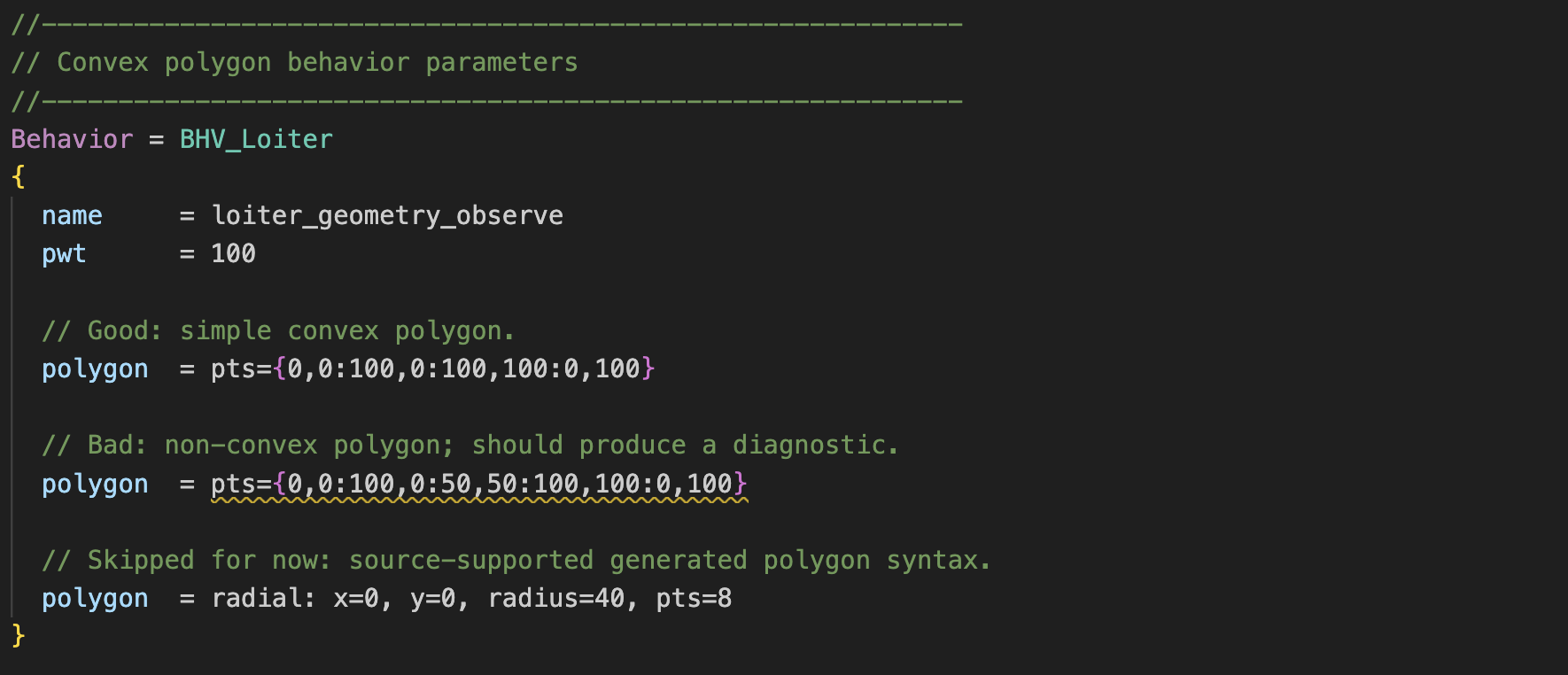
The diagnostics check true-or-false settings, numeric values, parameter ranges, and lists of route points. They also check whether supported polygon definitions are convex. The editor flags invalid polygon definitions while you’re writing the mission, so you can fix them before testing on a simulated or real vehicle. Catching it before a mission starts is useful for experienced developers too, especially when they’re editing several behaviors at once.
The checks are deliberately limited to cases we can support from source or documentation. They don’t pretend to evaluate a whole mission or replace running it. The contribution was merged into the community project, building on the editor created by its original maintainers.
Fitting into existing projects
I also added formatting and folding, which lets users collapse sections of a file, with attention to comments and conditional configuration directives. Formatting is opt-in, so installing the extension doesn’t unexpectedly rewrite a project’s files. Feature controls and the ability to silence individual warnings let users keep the useful checks without being forced into one editing style.